Safety Forms
Site Specific Hazard Assessment - FLHA
A Site Specific Hazard Assessment (FLHA) that goes beyond the usual task/hazard/control table - Emergency Response details, a Shift Close Out check, weather conditions, worker participation sign-in, and an end-of-shift reassessment - delivered as a real 2-page fillable PDF.
- Fillable PDF — type into it on any device, or print it blank
- 2 pages, 11" x 8.5" (Letter, landscape)
- Add your company logo at checkout — no extra charge
- Written by Canadian safety professionals to provincial OHS standards
- Instant download after purchase
Written by certified COR auditors · Trusted by Canadian contractors for 17+ years · Secure Stripe checkout · Instant delivery + re-download any time from your purchases page
Pairs with online training
Certificates issue instantly through our online training portal.
TASKS, HAZARDS AND CONTROLS PLUS EMERGENCY RESPONSE, WEATHER AND WORKER SIGN-IN, ALL ON ONE ASSESSMENT
What you get
- A fillable PDF - type directly into every blank, checkbox, and table cell across both pages
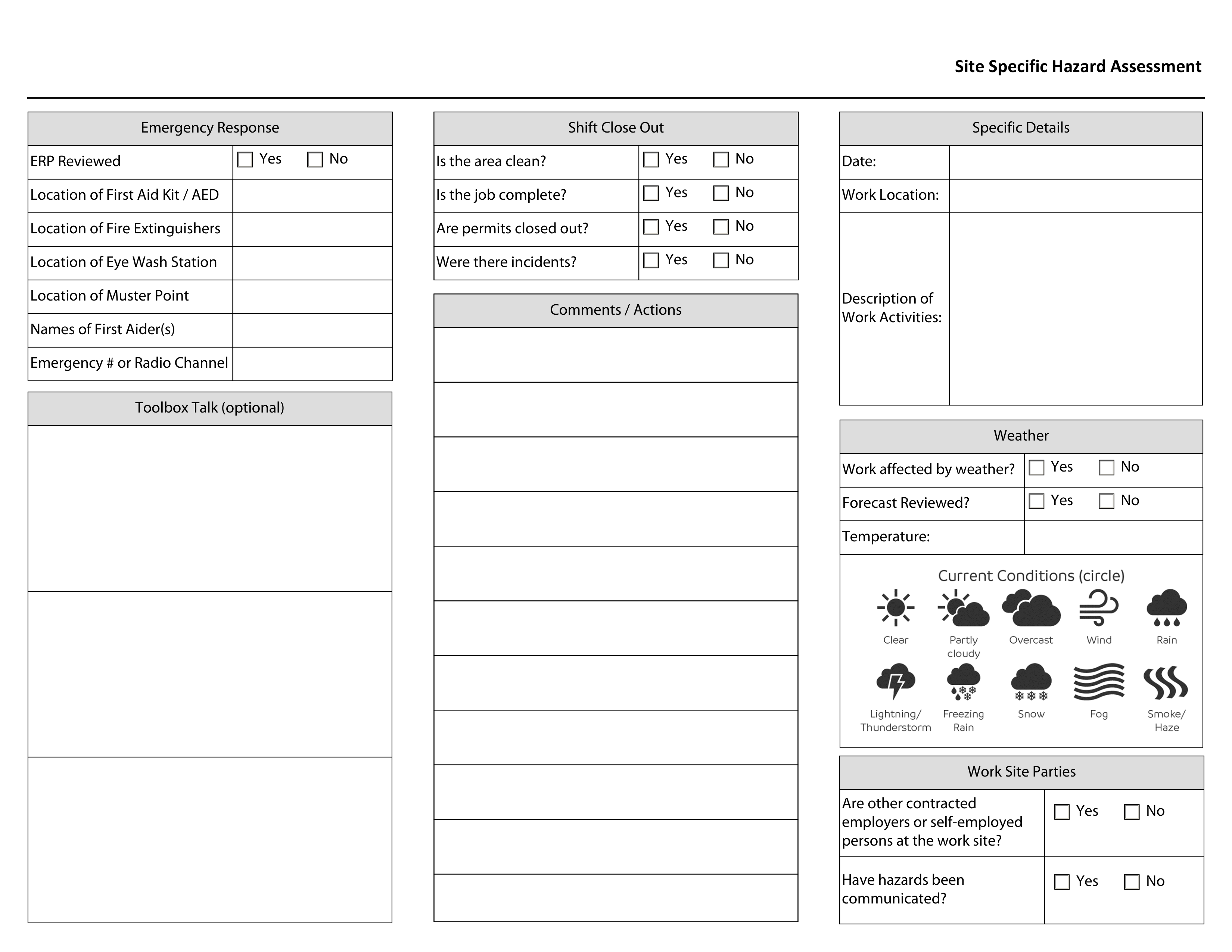
- Emergency Response details (First Aid Kit/AED, Fire Extinguishers, Eye Wash Station, Muster Point, First Aiders, Emergency Radio Channel) and an optional 3-part Toolbox Talk area
- Shift Close Out checks (area clean, job complete, permits closed out, incidents), an 11-line Comments/Actions area, and Specific Details (Date, Work Location, Description of Work Activities)
- A Weather block (affected-by-weather and forecast-reviewed checks, Temperature, and a Current Conditions icon reference) plus Work Site Parties questions about other contractors and hazard communication
- A built-in reference guide - the 5-step Hazard Assessment Process, an Examples of Hazards icon grid across Physical/Chemical/Biological/Psychological categories, and the Hierarchy of Controls
- A 5-row Tasks/Hazards/Controls table, a 6-row Worker Participation sign-in log (Pre-Job, Reassessment, End of Shift), and a 2-row Reassessment table for new tasks, hazards, and controls found mid-shift
- Your company logo added to the form, at no extra charge
How to fill it out and keep it. Open it in Adobe Acrobat Reader (free) or a desktop browser like Chrome or Edge, then use that program's own Save or Download button, not just closing the tab, so your entries are kept in the saved copy. On a phone, most PDF apps will let you view the form but not type into it - fill it out on a computer, or print it and use a pen.
Specifications
- Size
- 11" x 8.5" (Letter, landscape), 2 pages
- Format
- Fillable PDF - type into it on any device, or print it blank
- Company logo
- Included - upload at checkout, or we print your company name instead
- Delivery
- Instant download after purchase
Why crews use it
- Emergency Response details live on the same page as the hazard assessment, so a crew doesn't need a separate document to know where the first aid kit or muster point is
- A Shift Close Out check and Reassessment table capture what changed during the shift, not just what was planned before it started
- Worker Participation sign-in with Pre-Job, Reassessment, and End of Shift columns tracks engagement across the whole shift, not a single morning signature
- The built-in Hazard Assessment Process, hazard category icons, and Hierarchy of Controls reference means a crew doesn't need to remember a separate training document to fill this out correctly
Built for
- Crews and supervisors running a full-shift site-specific hazard assessment, not just a quick pre-job checklist
- Companies wanting weather, emergency response, and worker sign-in documented alongside the tasks/hazards/controls themselves
- COR/SECOR audit evidence of a complete, reassessed FLHA process across an entire shift
Why it matters
A hazard assessment that only captures the morning plan misses everything that changes once work actually starts - a weather shift, a new contractor showing up, a task nobody anticipated. Building Shift Close Out, Reassessment, and worker sign-in into the same document as the original task/hazard/control table is what turns a one-time paper exercise into a record of hazards actually managed through the whole shift.
Try it right here
Click a box. Type a line. See how it feels before you buy.
This is the real form layout - what you type here isn't saved or sent anywhere, it's just so you can see the fields work before you pay.
Common questions
Before you buy
What people ask us about the Site Specific Hazard Assessment - FLHA.
What is the Site Specific Hazard Assessment - FLHA used for?
A Site Specific Hazard Assessment (FLHA) that goes beyond the usual task/hazard/control table - Emergency Response details, a Shift Close Out check, weather conditions, worker participation sign-in, and an end-of-shift reassessment - delivered as a real 2-page fillable PDF. Who uses it: Crews and supervisors running a full-shift site-specific hazard assessment, not just a quick pre-job checklist; Companies wanting weather, emergency response, and worker sign-in documented alongside the tasks/hazards/controls themselves; COR/SECOR audit evidence of a complete, reassessed FLHA process across an entire shift.
Can we fill it in on a computer, or is it print-only?
Both. It is a fillable PDF, so every field can be typed into on a laptop or tablet and saved, or you can print it blank and fill it in by hand. Your company logo is added at no extra charge.
Does using this form make us compliant?
No single form makes a company compliant. A form is the evidence half of a safety program - it records that something was checked and by whom. It carries weight at audit time when the written program behind it says the check is required and how often. If that program does not exist yet, that is the part we write.
When do I get it?
Immediately after checkout as a download, and you can re-download it any time from your purchases page. Print or fill in as many copies as your own crews need.
From the team that wrote it
These forms come from a bigger program.
Inspection and competency forms are the evidence half of a safety program. If the program they belong to does not exist yet, or has not been updated in a few years, that is the part we write.