
Safety Forms
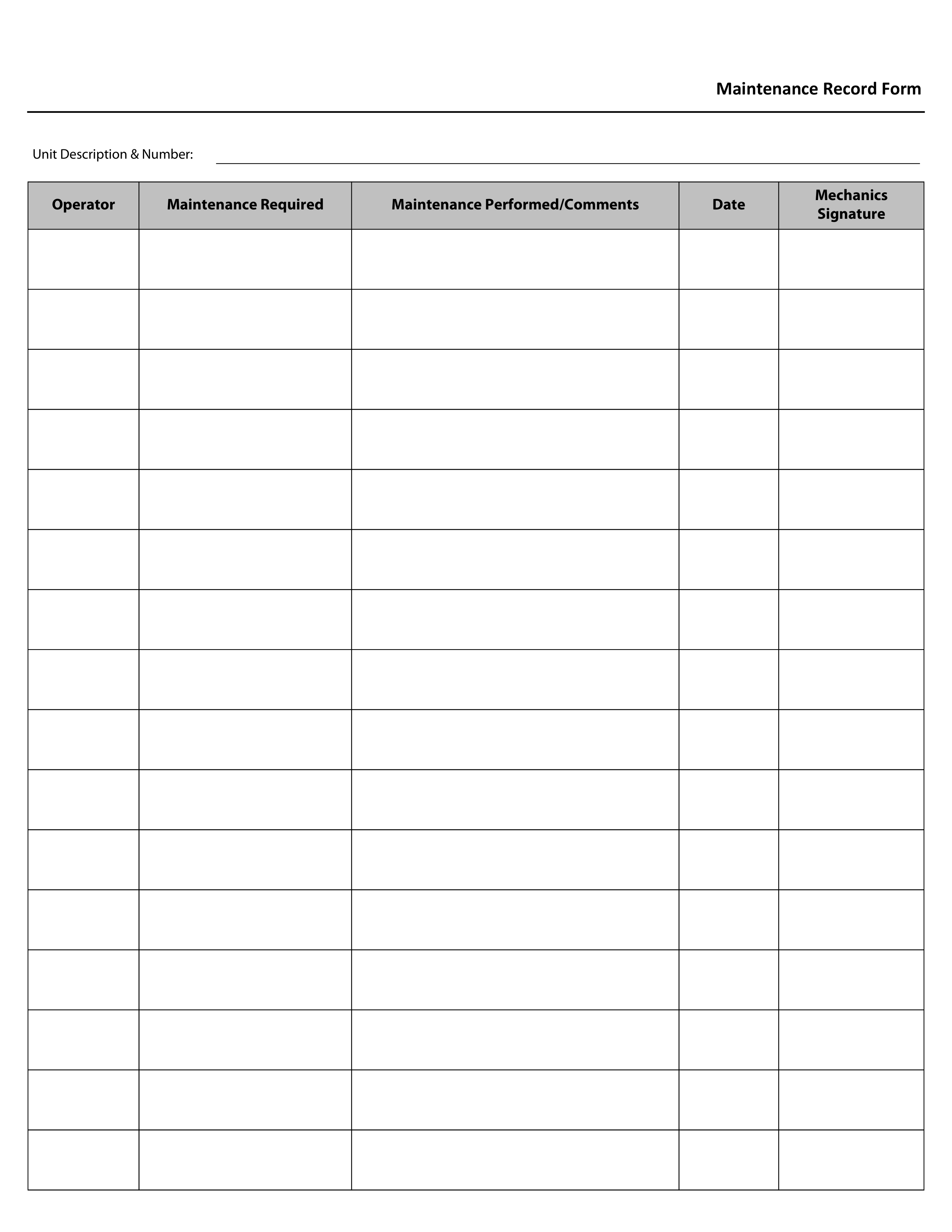
Maintenance Record Form
A Maintenance Record Form that tracks a single piece of equipment's full service history - what the operator flagged, what maintenance was actually performed, when, and which mechanic signed off - delivered as a real fillable PDF you keep with the unit.
- Fillable PDF — type into it on any device, or print it blank
- Single page, 8.5" x 11" (Letter)
- Add your company logo at checkout — no extra charge
- Written by Canadian safety professionals to provincial OHS standards
- Instant download after purchase
Written by certified COR auditors · Trusted by Canadian contractors for 17+ years · Secure Stripe checkout · Instant delivery + re-download any time from your purchases page
Pairs with online training
Certificates issue instantly through our online training portal.
ONE UNIT, 16 SERVICE ENTRIES, EVERY MECHANIC'S NAME ATTACHED TO WHAT THEY FIXED
What you get
- A fillable PDF - type directly into every row
- A Unit Description & Number header field to identify the specific piece of equipment
- 16 rows, each with Operator, Maintenance Required, Maintenance Performed/Comments, Date, and Mechanics Signature
- Your company logo added to the form, at no extra charge
How to fill it out and keep it. Open it in Adobe Acrobat Reader (free) or a desktop browser like Chrome or Edge, then use that program's own Save or Download button, not just closing the tab, so your entries are kept in the saved copy. On a phone, most PDF apps will let you view the form but not type into it - fill it out on a computer, or print it and use a pen.
Specifications
- Size
- 8.5" x 11" (Letter)
- Format
- Fillable PDF - type into it on any device, or print it blank
- Company logo
- Included - upload at checkout, or we print your company name instead
- Delivery
- Instant download after purchase
Why crews use it
- Recording what the operator reported alongside what the mechanic actually did closes the loop on every maintenance request, instead of leaving 'was this ever fixed' as a guess
- A dedicated Mechanics Signature column creates accountability for every repair entry, not just a checkmark with no name attached
- 16 rows give a single unit a genuinely long service history on one page before a new sheet is needed
- Tying the record to one Unit Description & Number keeps a fleet or shop's maintenance history organized by equipment, not buried in a general logbook
Built for
- Shops and fleets maintaining a per-unit service history for mobile equipment, vehicles, or machinery
- Mechanics and maintenance leads documenting completed repairs with a clear operator-to-mechanic chain
- Companies building COR/SECOR audit evidence of a documented equipment maintenance program
Why it matters
A verbal 'yeah, I fixed that' isn't documentation, and an operator who reports a defect with no record of what happened next has no way to know if it's safe to use the equipment again. A signed, dated maintenance record for each unit is what turns 'someone probably looked at it' into proof of what was actually done, by whom, and when.
Try it right here
Click a box. Type a line. See how it feels before you buy.
This is the real form layout - what you type here isn't saved or sent anywhere, it's just so you can see the fields work before you pay.
Common questions
Before you buy
What people ask us about the Maintenance Record Form.
What is the Maintenance Record Form used for?
A Maintenance Record Form that tracks a single piece of equipment's full service history - what the operator flagged, what maintenance was actually performed, when, and which mechanic signed off - delivered as a real fillable PDF you keep with the unit. Who uses it: Shops and fleets maintaining a per-unit service history for mobile equipment, vehicles, or machinery; Mechanics and maintenance leads documenting completed repairs with a clear operator-to-mechanic chain; Companies building COR/SECOR audit evidence of a documented equipment maintenance program.
Can we fill it in on a computer, or is it print-only?
Both. It is a fillable PDF, so every field can be typed into on a laptop or tablet and saved, or you can print it blank and fill it in by hand. Your company logo is added at no extra charge.
Does using this form make us compliant?
No single form makes a company compliant. A form is the evidence half of a safety program - it records that something was checked and by whom. It carries weight at audit time when the written program behind it says the check is required and how often. If that program does not exist yet, that is the part we write.
When do I get it?
Immediately after checkout as a download, and you can re-download it any time from your purchases page. Print or fill in as many copies as your own crews need.
From the team that wrote it
These forms come from a bigger program.
Inspection and competency forms are the evidence half of a safety program. If the program they belong to does not exist yet, or has not been updated in a few years, that is the part we write.