
Safety Forms
Tag Out Repair List Form
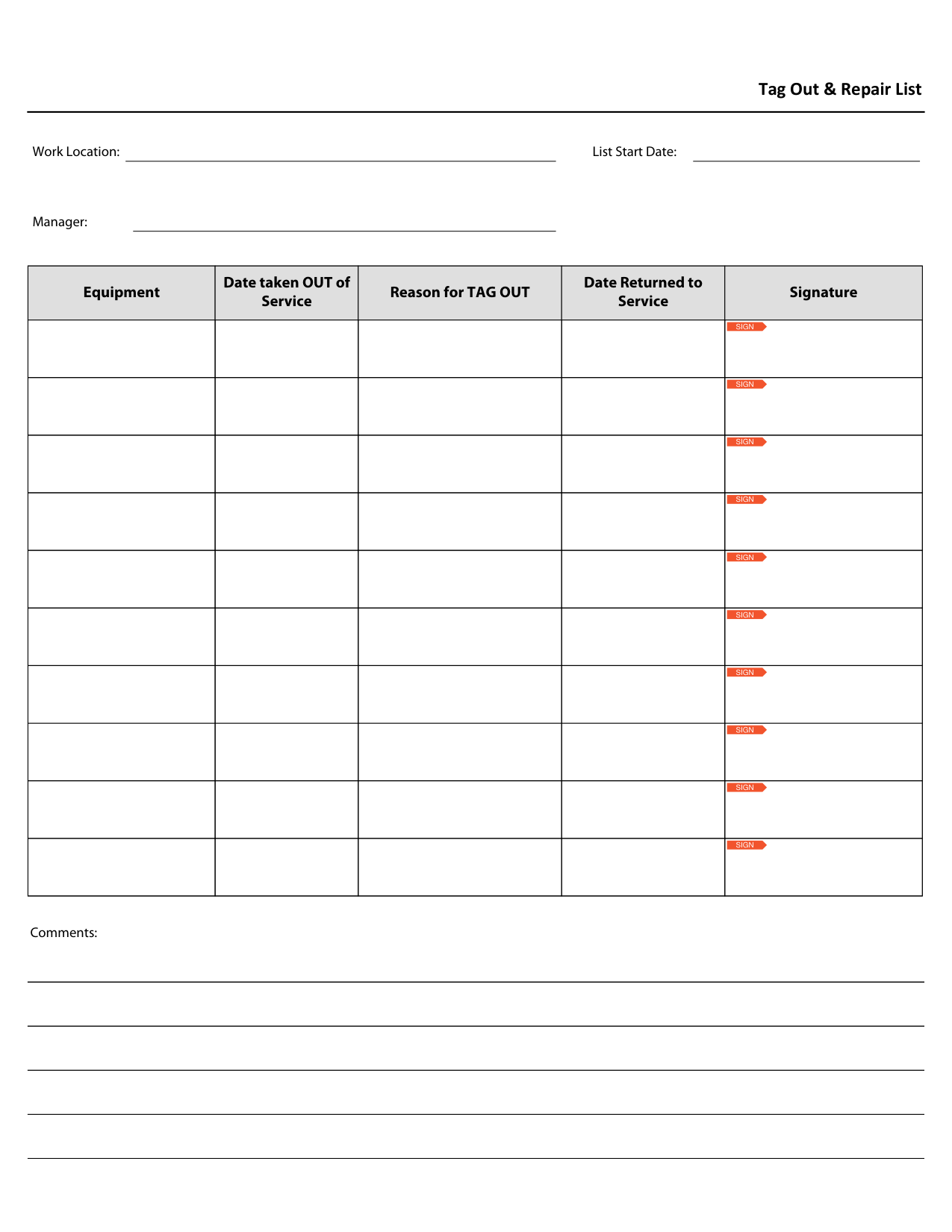
A running log for tagged-out equipment - what was taken out of service, why, when it went out, and when it came back - kept as one list instead of a stack of individual tags with no central record, delivered as a real fillable PDF.
- Fillable PDF — type into it on any device, or print it blank
- Single page, 8.5" x 11" (Letter)
- Add your company logo at checkout — no extra charge
- Written by Canadian safety professionals to provincial OHS standards
- Instant download after purchase
Written by certified COR auditors · Trusted by Canadian contractors for 17+ years · Secure Stripe checkout · Instant delivery + re-download any time from your purchases page
Pairs with online training
Certificates issue instantly through our online training portal.
TRACK EVERY PIECE OF EQUIPMENT FROM TAG OUT TO RETURN TO SERVICE
What you get
- A fillable PDF - every equipment entry and signature is a real form field, typed or handwritten
- A 10-row table tracking Equipment, Date taken OUT of Service, Reason for TAG OUT, Date Returned to Service, and Signature
- Work location, list start date, and manager fields so the log identifies exactly whose equipment and whose site it covers
- A comments section for anything the table rows don't capture
- Your company logo added to the form, at no extra charge
How to fill it out and keep it. Open it in Adobe Acrobat Reader (free) or a desktop browser like Chrome or Edge, then use that program's own Save or Download button, not just closing the tab, so your entries are kept in the saved copy. On a phone, most PDF apps will let you view the form but not type into it - fill it out on a computer, or print it and use a pen.
Specifications
- Size
- 8.5" x 11" (Letter)
- Format
- Fillable PDF - type into it on any device, or print it blank
- Company logo
- Included - upload at checkout, or we print your company name instead
- Delivery
- Instant download after purchase
Why crews use it
- One list per work location means a supervisor can see everything currently tagged out at a glance, instead of walking the shop counting tags
- A Date Returned to Service column with no entry is an immediate flag - equipment that's been out longer than it should be jumps out on the page
- A signature on every line ties each tag-out and return decision to a specific person, not just a note on the equipment itself
- Keeping the list running across a full page (10 rows) means weeks of tag-out activity live on one document instead of a new form for every incident
Built for
- Shop supervisors and maintenance leads managing equipment taken out of service for repair
- Safety coordinators tracking lockout/tagout activity as part of a documented safety program
- Companies assembling COR/SECOR audit evidence for equipment maintenance and control-of-hazardous-energy procedures
Why it matters
A tag on a piece of equipment tells the next person not to use it - but it doesn't tell anyone how long it's been out, why, or who's responsible for getting it back in service. A running list with a date out and a date returned turns a shop full of individual tags into a single record a supervisor can actually manage.
Try it right here
Click a box. Type a line. See how it feels before you buy.
This is the real form layout - what you type here isn't saved or sent anywhere, it's just so you can see the fields work before you pay.
Common questions
Before you buy
What people ask us about the Tag Out Repair List Form.
What is the Tag Out Repair List Form used for?
A running log for tagged-out equipment - what was taken out of service, why, when it went out, and when it came back - kept as one list instead of a stack of individual tags with no central record, delivered as a real fillable PDF. Who uses it: Shop supervisors and maintenance leads managing equipment taken out of service for repair; Safety coordinators tracking lockout/tagout activity as part of a documented safety program; Companies assembling COR/SECOR audit evidence for equipment maintenance and control-of-hazardous-energy procedures.
Can we fill it in on a computer, or is it print-only?
Both. It is a fillable PDF, so every field can be typed into on a laptop or tablet and saved, or you can print it blank and fill it in by hand. Your company logo is added at no extra charge.
Does using this form make us compliant?
No single form makes a company compliant. A form is the evidence half of a safety program - it records that something was checked and by whom. It carries weight at audit time when the written program behind it says the check is required and how often. If that program does not exist yet, that is the part we write.
When do I get it?
Immediately after checkout as a download, and you can re-download it any time from your purchases page. Print or fill in as many copies as your own crews need.
From the team that wrote it
These forms come from a bigger program.
Inspection and competency forms are the evidence half of a safety program. If the program they belong to does not exist yet, or has not been updated in a few years, that is the part we write.